The best book scanner picks deliver sharp page capture, robust OCR, and easy workflow for students, researchers, educators, and archivers. This guide highlights five top options that balance image quality, hardware design, and language support. If you work with thick volumes or delicate bindings, look for flattening or deskew features; for multilingual projects, ensure OCR coverage. The following selections are well-suited to different buyers—from academic librarians to teachers and personal archivists.
Summary Table of Selected Products
| Product | Best For | Key Benefit | Limitations |
|---|---|---|---|
| CZUR ET MAX Professional Book Scanner | Researchers, librarians, heavy-duty use | High-resolution 38MP sensor with curve-flattening | Thai and Hebrew OCR limitations |
| CZUR Shine Ultra Smart Portable Document Scanner | Teachers, students, remote learning | Ultra-fast A3 scans and versatile doc camera | Not Android/iOS compatible |
| CZUR Aura Pro Book & Document Scanner | Desk workers and small offices | AI-powered auto-flattening and flexible formats | OCR limitations on Thai/Hebrew/Arabic |
| CZUR ET24 Pro Professional Book Scanner | Professional archiving and academic work | 24MP camera, improved flattening | Linux support limited |
| IRIScan Book 7 White Portable Scanner | On-the-go scanning | Portable handheld with OCR and SD card | Smaller sensor, handheld form factor |
CZUR ET MAX Professional Book Scanner

The ET MAX combines a high-resolution 38MP CMOS sensor with a 7168 × 5376 image capture, delivering up to 410 DPI for detailed pages. Its patented Curve-Flattening Technology automatically flattens curved book pages and removes distortion, so you can scan without unbinding. This model includes powerful OCR that converts scans into editable Word, Excel, and searchable PDFs in 180+ languages. It is best for researchers and librarians who need accurate page geometry and robust text recognition across languages. A noted limitation is that Thai and Hebrew OCR are not supported on this line, and Arabic OCR is restricted to certain Windows configurations on ET Series devices. If your OCR needs include these languages, plan to verify support in advance.
Best for: Academic researchers, libraries, and archival projects that demand high detail and reliable text extraction across many languages.
Why selected: Combines top-tier image quality with curve-flattening for bound volumes, enabling high-accuracy digitization without unbinding.
CZUR Shine Ultra Smart Portable Document Scanner

The Shine Ultra focuses on speed and flat scanning for A3 and A4 documents. It supports Windows and macOS (not Android or iOS) and offers an ultra-fast scan time of about one second per page for flat papers. OCR covers 180+ languages, but Thai, Hebrew, and Arabic are not supported. The patented flattening curve technology helps smooth curved pages after pixel transformation, making it a strong fit for educators and students who frequently digitize classroom handouts or coursework. The device is ideal for flat documents and serves well as a USB document camera for remote learning setups, including integration with meeting tools like Zoom or Google Meet. A potential limitation is its lack of mobile OS compatibility, which may affect users who need Android or iOS support.
Best for: Teachers and students who need fast, flat scans of A3/A4 pages and OCR in many languages on desktop systems.
Why selected: Fast, reliable flat-scanning with a trusted CZUR flattening approach and broad OCR language support for classroom materials.
CZUR Aura Pro Book & Document Scanner

The Aura Pro delivers auto-flattening and AI-assisted deskew to streamline multi-page scanning. It supports both A3 and A4 sizes and outputs to JPG, Word, PDF, and searchable PDF formats. OCR supports 180+ languages with Thai, Hebrew, and Arabic not currently supported. The device runs on Windows and macOS, with CZUR APP control and a glare-free lamp to reduce eye strain during long sessions. It is well-suited for small offices or home offices that need fast, format-flexible scanning with smart deskew and flattening features. Caution: ensure your environment matches the language support notes before purchase.
Best for: Small offices or individual users needing AI-assisted flattening and flexible file outputs.
Why selected: Combines smart image processing with practical output formats and a user-friendly app, aiding efficient digitization workflows.
CZUR ET24 Pro Professional Book Scanner
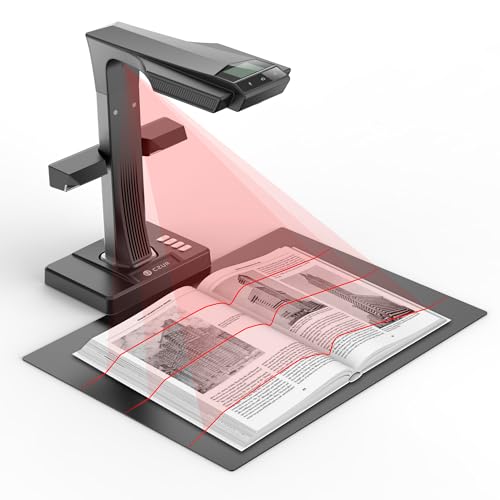
The ET24 Pro upgrades with a 24MP camera and 320 DPI resolution at 5696 × 4272. It continues CZUR’s flattening approach to flatten curved book pages post-transformation, supporting a broad range of formats and languages in OCR for Windows, macOS, and Linux (Kubuntu 22.04 and related distributions). This model is suitable for users who require strong flattening on 3D pages and compatibility across multiple desktop operating systems, including Linux. A limitation to note is that certain Linux distributions outside tested lists may require additional setup for full compatibility.
Best for: Professionals and researchers who work across Windows, macOS, and Linux environments and need consistent flattening performance.
Why selected: Combines reliable 24MP capture and robust cross-OS support with improved page flattening for bound texts.
NetumScan 13MP Book Document Camera

The NetumScan model emphasizes smart, one-key automatic correction for skewed images and supports mass scanning with formats including Word and PDF. Its 1300W CMOS sensor provides bright, clear images for A4-sized pages, with Linux, Mac OS, and Windows compatibility. This option suits teachers and administrators who need quick, automated correction during class or archival sessions. A potential limitation is that it’s sized for A4 rather than larger formats, which may be restrictive for bigger documents.
Best for: Classrooms or offices needing efficient, automated correction and mass scanning for A4 documents.
Why selected: Simple, fast workflow with real-time correction and broad OS compatibility supports everyday digitization tasks.
Buying Guide
What to consider when choosing a book scanner
- Page size and binding: For bound volumes, look for automatic flattening/desking and curve correction to minimize manual work.
- Resolution and OCR: Higher megapixels and DPI yield crisper scans; confirm OCR language coverage meets your needs, noting language gaps listed by model.
- Platform compatibility: Decide if you need Windows, macOS, or Linux support and whether a device acts as a document camera for remote teaching.
- Output formats: Choose scanners that export to JPG, PDF, Word, and searchable PDFs for versatile workflows.
- Portability vs. desktop use: Portable units are great for on-the-go tasks, while larger models offer more robust scanning for home or office desks.
- Ease of use and software: AI enhancements, companion apps, and intuitive interfaces save time in digitization projects.
- Limitations and language support: Some models exclude certain OCR languages; verify any critical omissions before purchase.
FAQ
- What is the main advantage of a book scanner with curve-flattening technology?
- Which scanners support Linux, and what should I expect on that OS?
- Can these devices replace a traditional flatbed scanner for photos?
- What basic formats should I expect for exported files?
- Is OCR accuracy consistent across multiple languages?
- Do these scanners double as document cameras for remote teaching?
Whether you need high-resolution scans for archival work, fast classroom handouts, or portable scanning on the go, the right book scanner can streamline your workflow and improve digitization results. Review your binding, size, language needs, and computing environment to pick the best fit from these top options.