Discover top AI-powered writing companions that streamline note-taking, research transcription, and drafting. This guide highlights five standout Amazon picks designed to help students, professionals, and researchers produce polished papers faster. Each device blends handwriting, digital capture, and AI-assisted organization to support efficient writing workflows.
Summary Table Of Chosen Products
| Product | Brand | Key Strength | Format |
|---|---|---|---|
| AINOTE Air 2 Bundle – Black Folio Case | iFLYTEK | Voice-to-text, translation, ChatGPT meeting summaries | 8.2″ AI E Ink Tablet |
| XNote Smart Pen & Notebook Starter Set | Xnote | Real-paper writing with instant sync and AI organization | Smart notebook with pen |
| Penstar eNote 2 Paper Tablet Bundle | Penstar | PureView paper feel, 52-language transcription | 10.3″ E Ink tablet |
| AINOTE 2 – 10.65″ E Ink Tablet | iFLYTEK | Ultra-thin, handwriting-to-text, multilingual support | 10.65″ E Ink tablet |
| AINOTE Air 2 – 8.2″ AI Paper Tablet | iFLYTEK | Compact, voice-to-text, multi-language translation | 8.2″ AI paper tablet |
AINOTE Air 2 Bundle – Black Folio Case

The AINOTE Air 2 Bundle presents an 8.2-inch AI note-taking tablet designed for real-time voice-to-text and multilingual insights. It features ChatGPT-powered meeting summaries, making it suitable for academic lectures and business discussions. The device supports 15 transcription languages and converts handwritten notes into 85 languages, broadening its usefulness for international research teams and multilingual coursework. A paper-like writing experience is achieved with 4,096 pressure levels and low latency on an E Ink panel, supporting long writing sessions without fatigue.
XNote Smart Pen & Notebook Starter Set
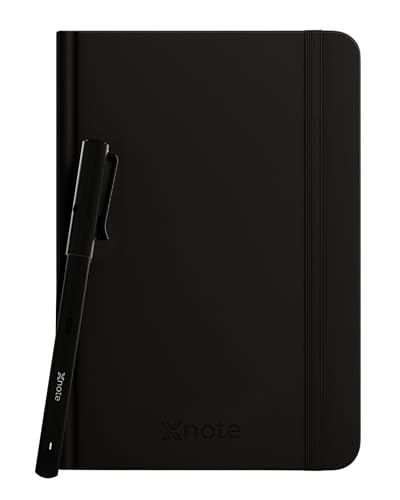
Write Naturally and Save Digitally with the XNote Starter Set. The experience blends real pen-and-paper writing with instant digital capture via Bluetooth sync to the XNote app. An AI-powered organization layer helps summarize lectures, auto-tag notes, enable keyword search, and translate into 50+ languages. With up to 17 hours of battery life and rapid recharging, this kit supports lengthy study sessions, making it a solid partner for drafting papers and compiling research notes.
Penstar eNote 2 Paper Tablet Bundle
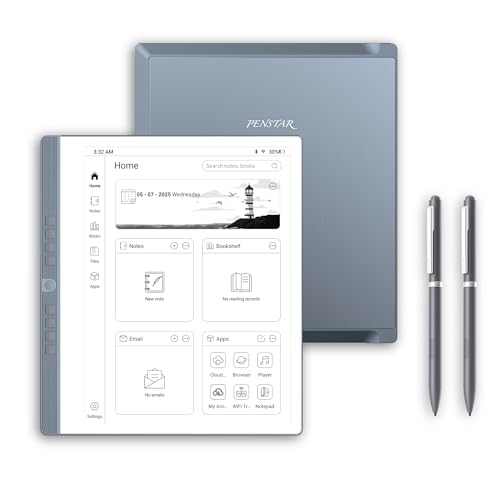
The Penstar eNote 2 offers a true paper-first experience on a 10.3-inch E Ink display with PureView technology that emphasizes clarity and comfort. The device prioritizes handwriting, with 300 PPI density and a responsive, paper-like surface. It supports real-time voice-to-text in 52 languages and can automatically generate structured meeting summaries using built-in AI tools. This makes it suitable for professionals attending conferences, students in seminars, and researchers compiling literature notes.
AINOTE 2 – 10.65″ E Ink Tablet

This ultra-thin 10.65-inch E Ink tablet weighs about 295g, delivering a portable digital notebook that suits on-the-go drafting. It emphasizes a paper-like writing experience with high-refresh, low-latency handwriting. The AI layer supports voice recording, real-time transcription, and multilingual translation. With multi-language handwriting-to-text capabilities and seamless integration with ChatGPT-powered workflows, it is well-suited for research notes, study guides, and classroom use.
AINOTE Air 2 – 8.2″ AI Paper Tablet

The AINOTE Air 2 combines a compact 8.2-inch form with AI-powered features for writing and research. Real-time voice-to-text, multi-language translation, and meeting summaries help streamline paper workflows. The device also includes schedule management tools, making it a versatile option for students scheduling group work and professionals coordinating research timelines. Its blend of portable form factor and intelligent transcription supports efficient drafting of papers and precise note capture during lectures.
Buying Guide
Key purchase considerations for AI-assisted paper writing tools include display and input comfort, transcription accuracy, and AI features that align with study or work needs.
- Screen type and writing feel: E Ink devices mimic paper and reduce eye strain, while compact LCD tablets may offer brighter displays but higher glare. Consider your preferred writing surface and session length.
- Handwriting to text quality: Look for devices offering high-pressure sensitivity, low latency, and robust handwriting-to-text conversion in your language set. Latency affects the naturalness of drafting.
- Voice transcription and translation: If you conduct multilingual research, prioritize models with multilingual transcription and translation accuracy. Real-time transcripts can speed up note generation for papers with sources in multiple languages.
- AI-assisted organization: Features such as automatic note tagging, keyword search, and automatic summaries help manage large research projects. Assess the depth and reliability of these tools for your workflow.
- Battery life and portability: For frequent library or campus use, consider weight and battery endurance. A longer battery reduces interruptions during longer drafting sessions.
- Compatibility and ecosystem: Some devices sync with mobile apps and cloud services. Check whether your preferred note-taking and writing apps integrate smoothly with the device ecosystem.
- Durability and accessories: Folio cases, stylus responsiveness, and screen protectors can extend device life and improve writing comfort during long study periods.
Across these options, the common thread is a balance of natural handwriting feel, accurate voice and text conversion, and AI-enabled organization. For writers who value quick transcription and multilingual support, models like AINOTE Air 2 and AINOTE 2 stand out. For those who prefer a real-paper experience with AI enhancements, Penstar and XNote provide robust ecosystems for drafting, editing, and reviewing notes—features that can be especially useful when assembling literature reviews or drafting sections of a paper.